SatNav GPS
Email Updates
Sign up now to our newsletter alerts (usually monthly).

Future speed camera database releases, hot topics, news and reviews.

Your privacy is important to us, we do not sell email details. Easily unsubscribe.

Enter Your Email

Navigate Our Site

MEMBERS AREA
Subscribe Now
Speed Camera Download
Submit Cameras
Free Competition
Member Discounts
Your Account
Member Forums

PUBLIC GPS FORUMS
Register to Post
Log in to Post
Private Messages
Your Account
Public GPS Forums

POINTS OF INTEREST
Free POIs
Submit POIs

REVIEWS & ARTICLES
Full Listing
[+] Apple
[+] Article
There is No Silver Bullet Accurate Traffic Information Requires Multiple Data Sources : Jul08

PocketGPSWorld.com Active Speed Camera Statistics : Jul08

Pocket GPS Terminology : Dec07

Galileo European GPS Constellation Gets Go Ahead : Nov07

A Day in The Life of a PocketGPSWorld.com Verifier : Nov07

Nikon D300 and D3 GPS enabled cameras : Nov07

The Ordnance Survey have 4 million POIs : Nov07

3,2,1 Liftoff... The latest GPS Satellite is successfully launched into orbit : Oct07

Mike's Muses: Diving with GPS? : Mar07

[+] Binatone
[+] Blaupunkt
[+] Brodit
[+] Carcomm
[+] CoPilot
[+] Destinator
[+] Directions Ltd
[+] Event
[+] Evermore
[+] Fugawi
[+] Garmin
[+] Globalsat
[+] Holux
[+] Intellinav
[+] Krusell
[+] Magellan
[+] Mapopolis
Mapopolis 4.71 review : Jun06

[+] Memory-Map
[+] Mio
[+] Nav N GO
[+] Navigon
[+] Navman
[+] Navteq
[+] Other
[+] Otterbox
[+] Qstarz
[+] Route66
[+] Royaltek
[+] Satmap
[+] TomTom
Carcomm x20/x30 Cradle CNM-165 : Aug08

TomTom - How to remove cameras Tutorial : Jul08

Speed Camera Voice Alert Collections for Garmin, Route66 and TomTom : Jun08

Customise your GPS/SatNav : May08

TomTom Navigator Custom Cursors : Apr08

Speed Camera Icons by GerryC : Feb08

Speed Camera Voice Alert Collections for TomTom and Route66 : Feb08

Speed Camera Voice Alert Collections for TomTom and Route66 : Feb08

TomTom GO 920T In-Depth Review : Jan08

Pocket GPS UK Safety Camera Database - TomTom Go/Rider/One - OV2 : Jan08

PocketGPSWorld Safety Camera Database - TOMTOM GO 910, x20 and x30 : Jan08

PocketGPSWorld Speed Camera Database - TOMTOM Navigator 5 & 6 : Jan08

TomTom NavCore 7.2 Device-Dependent Feature List : Oct07

TomTom Version 7 : Mapshare Moving a POI : Jun07

TomTom Version 7 : Map Share blocking/unblocking a road : Jun07

TomTom Bluetooth Remote Control Review : Jun07

TomTom Cannes Announcement report : Jun07

Publishing real time TomTom journey information on the internet : Oct06

TomTom One New Edition second thoughts : Oct06

TomTom Compatibility matrix for program builds and map versions : Sep06

TomTom One New Edition first thoughts : Aug06

Inside the TomTom GO 910 : Jul06

TomTom RIDER Review : Jan06

TomTom ONE Review : Jan06

TomTom 510 710 910 Overview : Jan06

TomTom RIDER Scooter Install : Jan06

PocketGPSWorld.com POICapture for TomTom 5 by Lutz Bendlin : Nov05

PocketGPSWorld.com POICapture for TomTom 5 by Lutz Bendlin : Nov05

PocketGPSWorld.com POICapture for TomTom GO by Lutz Bendlin : Nov05

Glarestomper II for TomTom GO review : Oct05

TomTom MK-II Bluetooth receiver review : Oct05

TomTom MK-II Bluetooth receiver review : Oct05

[+] Trimble
[+] ViaMichelin
[+] Wonde Proud

GPS CENTRAL
About Pocket GPS
Contact Pocket GPS
Corporate Enquiries
Free GPS Downloads
GPS Events
GPS Event Blogs
GPS Related FAQs
GPS Reviews
News Archive
Report Piracy
Stolen GPS Register
Submit GPS News
Suggestion Box
Site Map

HELP
Registration Help
Subscription Help
Speed Cameras Help

SEARCH
Search GPS News
Search the GPS Forums
Google Pocket GPS Search
Pocket GPS
Web


Bookmark & Share!

Click Now to Bookmark and Share Pocket GPS! Click Now to Bookmark and Share Pocket GPS!

Navigon Mobile Navigator 4.2 - Part 1/2 04th November 2004

Review by Dave Burrows


Part 1 - Introduction and Hardware

Part 2 - Software


Introduction

Navigon is an emerging name across Europe and Navigon's main office is situated in Würzburg, Germany. Recently Navigon have released European maps, started selling older versions with the Medion's packaged deal at Aldi Supermarkets and Halfords in the UK, and now Navigon have brought out version 4 of their Mobile Navigator which we will review here.


Navigon have taken a slightly different approach to marketing, Navigon MobileNavigator has always been pitched more at the business user, the kind of road warrior compared to the consumer who wants it more for recreational driving.


Hardware

There are a number of different bundles whether you are looking for a:-

  • Software Only
  • GPS Mouse + Software
  • GPS Mouse + TMC + Software
  • GPS Mouse + Bluetooth + Software
  • GPS Mouse + TMC + TMC ANTENNA + Bluetooth + Software

In The Box

Due to the amount of configurations I'm not going to go into detail with the In The Box section in this review. If you go with the GPS Mouse option with software you will receive a windscreen suction mount and all necessary cables to not only power the GPS but also charge your Pocket PC.


Modular Design

Navigon have created a GPS Receiver with a modular design. Although it is a little oversized compared to most on the market today, it gives you the customer, options in the future. If you just buy the basic GPS Receiver now, you should be able to purchase a plug-in module in the future to add Bluetooth or TMC, so it gives great scope for upgrade which is something you do not see in any other GPS Receiver! There are two types of modules. The first as you will see below are on the left, the second on the right.
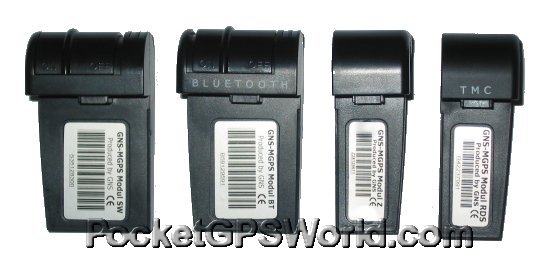


The first module is the standard GPS Mouse Module. This does nothing other than allow you to receive a GPS signal.


The second module is identical to the first but it gives you Bluetooth support.


The third module again is the basic module that most of you will receive.


The fourth module is the TMC module that allows you to receive TMC signals via FM Radio (it has a built in FM tuner).
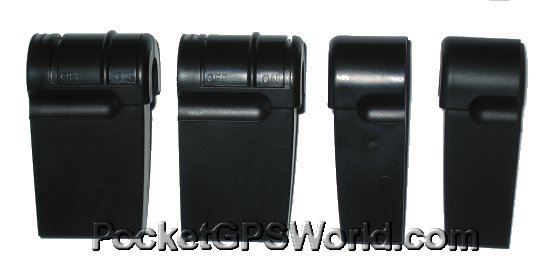


These modules then plug into the GPS Mouse that will sit on your dashboard. The difference with the mouse casing compared to most GPS Receivers is that it does not have a magnetic base, and therefore is obviously not designed to be placed on a car roof because it is not waterproof.
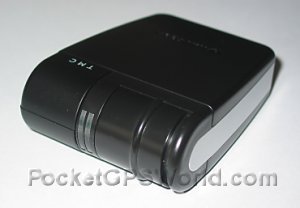


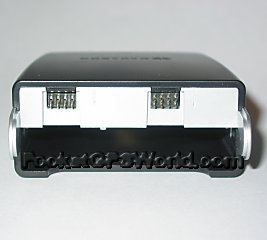
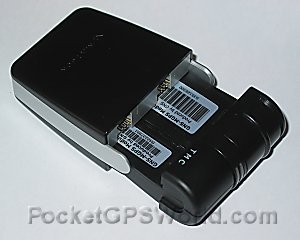
The modules that are shown in the photos above slot into the front part of the GPS Mouse and clip-in to the circuit board (see below). I like this design because it gives scope for upgrade and allows you to truly plug and play. On the back of the GPS Receiver there's a mini-USB plug on the left (above right). This is both for the power and data communication. The middle socket is an MCX antenna socket for an external antenna (optional), and the third socket is the TMC Antenna socket (which will come standard no matter which module design you purchase.


Cable Design

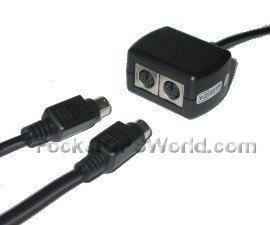
The cable design is quite impressive. If you look at the left hand photo below, the cable coming out of the right hand side of the junction box goes straight to the cigarette lighter plug which gives the GPS the power. On the left hand side of the junction box are two sockets PS/2 style in design. One cable goes straight out to plug into the mini-USB socket on the GPS Mouse. The other cable is the PDA cable that plugs in and gives you the power to your PDA and the data connection to the GPS.
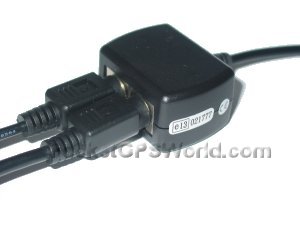


Unfortunately to keep this to a modular design, once you add the TMC module and TMC Antenna, it does mean you have a nice clutter of cables hanging off the dashboard that you need to try and conceal. However, if you do go for the Bluetooth module, in theory there's no need to have the power/data cable so you can do away with one of these and just use a standard PDA charger cable from cigarette lighter plug to PDA. This will then require you to have two cigarette lighter sockets in-car if you are going to do it this way.


I love the modular design which is ingenious, but the amount of cables does concern me.


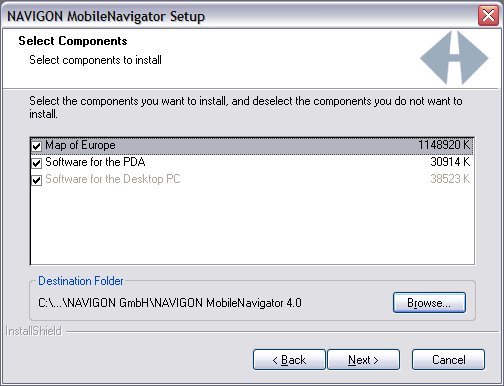
Software - PC Installation

PC installation of the software is required and that means transferring the complete Western european 7 CD set to your PC. This eats up a lot of space and in all is unnecessary but happens under the standard installation.


I had a problem that after getting part way through the install, Navigon (or Windows) decided to get confused which CD was which, and after trying to re-insert the CD a number of times, managed to jump start it by placing each CD into the CD tray one by one until it suddenly worked out which CD it required.


References

Manufacturers Website http://www.navigon.com
Pocket GPS Contributor Dave Burrows
Pocket GPS Contributor Website http://www.daveburrows.com
   
Rating  
Ability to plot route and follow
Voice Navigation Quality
Re-routing Quality
Map Detail
TMC - Traffic Avoidance
   
Overall Rating 94%
How did we achieve these ratings ? Review Ratings


Comments ?

Have any comments about this review ? Post them here.

Ads by Pocket GPS


#1 For GPS & PDAs
Sale! Find the latest 2008 Models in stock. Next day delivery. TomTom, HTC etc...
Handtec.co.uk/SatNav


Evermore GT-800
EverPhoto on Google Earth and Google Map for data logging and navigation
EvermoreGPS.com


TomTom Go 720
Specialists in refurbished Sat Navs incl. award winning TomTom GO720
TotalPDA.co.uk/GO 720


ProClip Car Mounts
Need a safe mount for your hand held device? Order a ProClip, clips on in seconds
ProClipUSA.com


Upgrade Garmin!
Click Here for 5 Superb Ideas for Garmin SatNavs. Free trial downloads!
Roadtour.co.uk


Advertise Here Now!
70 million totally targeted page views of your advert over a full 12 month period
PocketGPSWorld.com


Google Search

Google

Web
Pocket GPS